This post is available as a free downloadable checklist too.
1. Choose your destination
Common alternatives include Ghost, beehiiv, Kit and Buttondown.
Choose Ghost if you care most about your website design and want full control of that and if you primarily want to monetize with subscriptions or display ads.
Choose beehiiv if you want to monetize with ads (subscriptions work here too). (Note that this is my affiliate link)
Choose Kit if you’re worried about missing recommendations and/or if you want more of an email marketing tool.
Choose Buttondown if you need something lightweight and easy to set up. Their web archive isn’t great but their newsletters are nice and the platform has everything you need on the newsletter side.
Patreon locks you in because they have their own payment processor (not Stripe) so I don’t recommend moving there.
2. Email your chosen destination to see if they will help you migrate
Most of them will! This is most helpful with your paid subscriptions but some will help with content or even design setup too
3. Set up your new tool
Add your colors, logo and domain name. Set up the layout or choose your theme. What this set up entails will depend on where you go. Check their documentation.
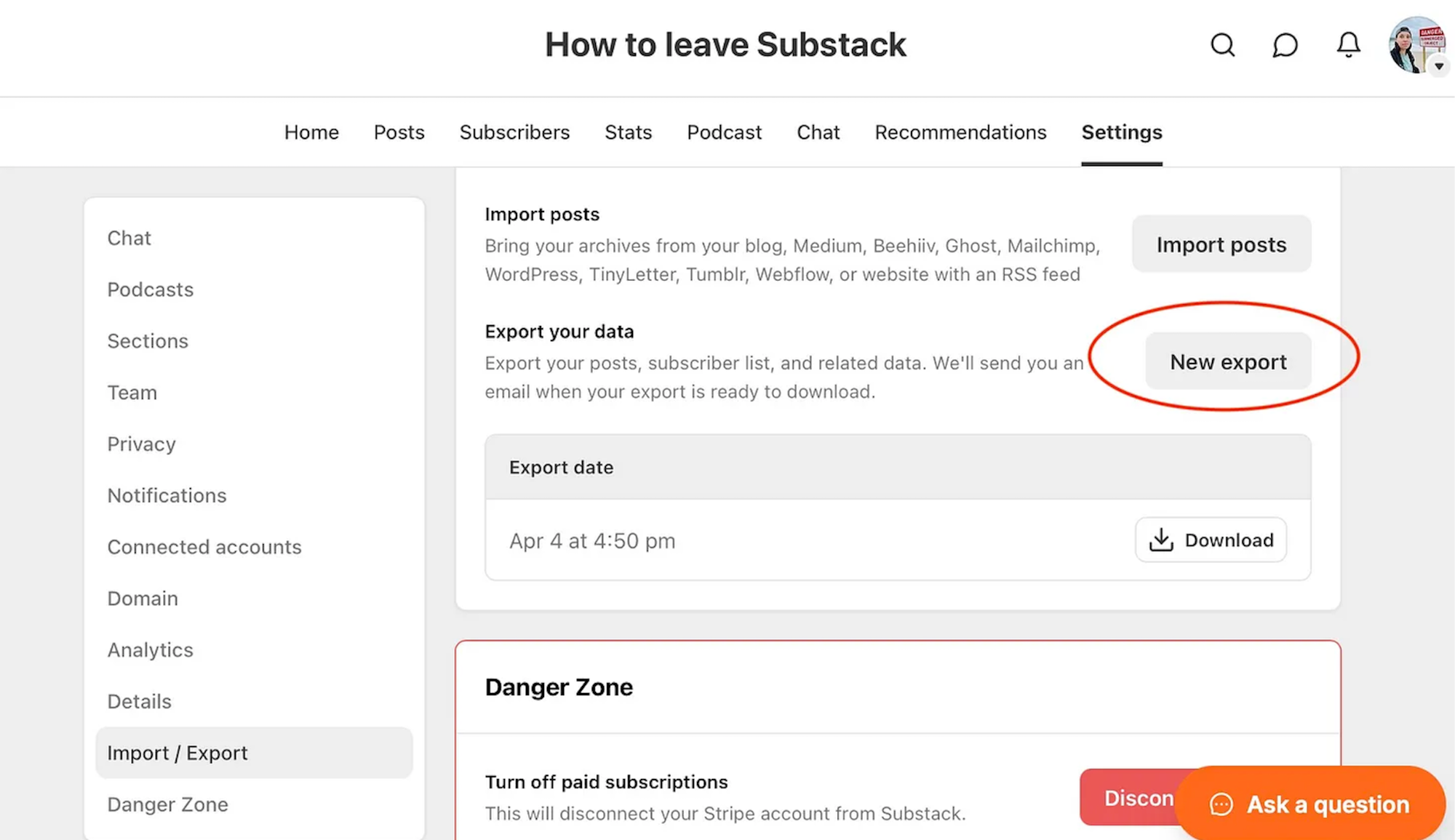
4. Export posts and subscribers from Substack
Go to your publication settings and download the full package (see screenshot below)
5. Import to your new tool
If your destination won’t assist with migration, see if they have self-serve importers. All the tools I mentioned do so you upload the zip file and it gets unpacked and remapped to your new landing space.
I recently did this migration with Ghost and it even downloaded and uploaded all the images to the new place. The posts look mostly great minus a couple minor clean up tasks.
6. Migrate your paid subscribers
There is lots of confusion about this part—YOU CAN MIGRATE YOUR PAID SUBSCRIBERS with two caveats. The first is your receiving platform has to also connect to Stripe. Most do, but check with Patreon or others I didn’t name to make sure they use Stripe for payments. The second is that due to Substack’s recent integration with Apple, your Apple subscriptions cannot move.
Reach out to your receiving platform to migrate subscriptions over. If you’re techy, you can follow the steps in Stripe’s dashboard, it’s not that hard but most platforms will help so use their help. You’re basically setting up the tiers again, importing your subscribers’ payment info and reconnecting them so Stripe knows what to charge them. Your free subscribers (all subscribers actually) are in the export bundle so they’re already loaded in if you ran the import or had a team help you.
Once you’ve moved away, be sure you email Substack and have them remove their 10% cut. Otherwise, you’ll keep paying them in the new location for no reason.
7. Migrate your podcast
If you have a podcast on Substack, you'll need a new podcast host. Check with your receiving platform to see what integrations they have available. For example, with Ghost + Outpost, you can sync a podcast hosted on Transistor and automatically create new posts for each episode and/or lock episodes for paid subscribers only. beehiiv just added hosting for podcasts too.
If your podcast is not paywalled, you can move to any podcast host and just link the show in your top navigation. Many podcast hosts will help you migrate an active show.
8. Tell your readers on Substack that you’re moving
I recommend giving them a heads up as soon as you decide your timeline, maybe a month or less before you move. Make sure to let paid subscribers know a couple times because their billing will now exist in a new place (wherever you move.)
Put up a goodbye post when you do make the switch and change your subscribe and about pages to point to the new site, especially if you weren’t using a custom domain on Substack. You can either leave your publication up or delete it. You can always move new subscribers over by setting up an automation or downloading them periodically.
9. Contact your recommendations partners
One of the big reasons people like Substack is “the network.” The network is just people! Talk to them! Ask your fellow publishers if they’ll continue to trade cross-promotion with you. Y’all don’t need a sketch opt in widget. Just toss a couple mentions of each other in your newsletters. Or include each other in your welcome emails. There’s lots of great ways to cross-promote! You can also check out the new platform agnostic tool Trustfnd—here’s my post about them.
10. Set up proper welcome flows
Once your basics are in, make sure you pull over your free and paid welcome email. On other platforms you’ll have way more options to actually extend these into full sequences that encourage reading and upgrading or properly onboard new paid members. There’s tons you can automate when you leave Substack and have access to either built in automation tools or Zapier using the public APIs every tool that’s not Substack has.
Note that if you switch to Ghost, you’ll need Outpost for this. Outpost is a paid partner of mine but they are also the main option for Ghost publishers unless you want a second email provider.
Celebrate your freedom
You did it. You’re free of this intellectual property theft machine. You can rest easy knowing your work and your audience is safe away from the Peter Thiel brigade. I’m sending you a high five!
If you’re wondering how to find your best promotion channels and how to grow your paid subscriber base, I write about that in Revenue Rulebreaker and here on the Paid Newsletter Playbook. Come hang.
This post is available as a free downloadable checklist too.
Related post:
 Lex Roman